AI agent skills explained for beginners
A beginner-friendly explanation of AI agent skills, including inputs, workflows, outputs, guardrails, and practical examples.
Introduction
A skill is a reusable way to work.
If a prompt is a single request, an AI agent skill is a reusable workflow. It gives the AI assistant a job, required inputs, process, output format, and limits.
Beginners can think of a skill as a recipe. The quality comes from clear ingredients, clear steps, and clear expectations for the finished result.
Why this matters
Skills make AI work easier to repeat.
Most people start with one-off prompts. That works for experiments, but it becomes messy when the same task has to be repeated across articles, clients, classes, or team workflows.
A skill keeps the good version of the workflow available so you do not have to rebuild it every time.
Core problem
Prompts can be too easy to forget.
A useful prompt often grows into several instructions, examples, rules, and formatting needs. If it stays as loose text, it becomes hard to maintain.
A skill gives that prompt a home and a structure.
Workflow
The beginner skill structure.
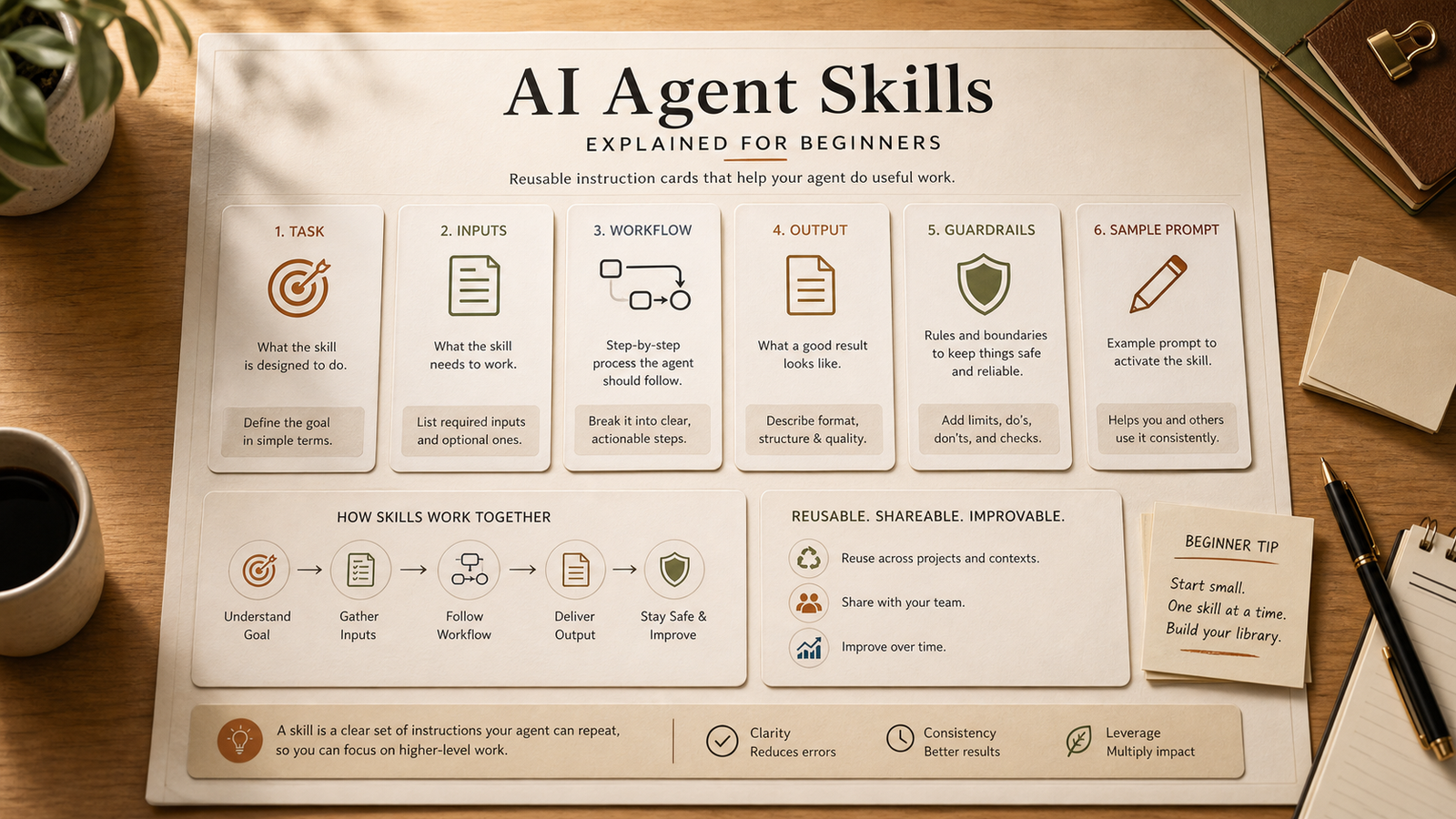
Every practical skill can start with the same simple parts.
Task: what the skill is meant to accomplish.
Inputs: what the user must provide.
Workflow: the ordered steps the AI should follow.
Output: the final sections, format, or file type.
Guardrails: what the AI should not invent or do.
Example: a sample user request that shows how to run the skill.
Example prompt
Prompt to define a first skill.
Use this when you want to turn a repeated task into a skill.
Copy-ready prompt
Help me turn this repeated task into an AI agent skill: [TASK]. Ask me for the required inputs, then create a skill outline with purpose, user, problem solved, workflow steps, output format, guardrails, and a sample user prompt. Keep the scope narrow and practical.
Practical use case
A research brief skill.
Instead of asking for a research summary every time, a research brief skill can ask for topic, audience, purpose, source notes, and desired format.
It can then return key questions, assumptions, source checklist, summary sections, and next steps without pretending to replace source verification.
Tools needed
You can start with plain text.
You do not need a complex platform to understand agent skills. A markdown file, JSON file, or saved prompt document is enough for a first version.
NEOA provides examples, a builder tool, and free resources so you can learn the pattern before adding automation.
Mistakes to avoid
Keep the first skill narrow.
Beginners often try to build one skill that does everything. That makes the output hard to predict.
Choose a focused task such as article brief, research brief, FAQ planning, content refresh, or internal linking.
Recommended NEOA resource
Learn by inspecting free skill examples.
Browse NEOA's free agent skills and the SEO Agent Skill Pack. Compare the inputs, workflow steps, output contracts, and guardrails.
Then save the examples that match your own workflow to your dashboard.
Detailed workflow
Turn a repeated task into your first skill.
Beginners should avoid starting with automation. Start by writing down the task you already repeat manually, then turn that task into a structured instruction card.
The goal is not to make the AI sound impressive. The goal is to make the same task easier to run, review, and improve.
Choose a task you repeat at least weekly, such as summarizing research, writing briefs, or planning FAQs.
Write the exact result you want at the end of the task.
List the information the AI needs before it can do the work responsibly.
Break the task into ordered steps that a careful human would follow.
Define the final output sections so the result is easy to review.
Add guardrails for things the model should not invent or overstate.
Test the skill once, revise the unclear instructions, then save the improved version.
Improved prompt
Beginner skill creation prompt.
Use this prompt when a saved prompt has become useful enough to structure.
Copy-ready prompt
I am new to AI agent skills. Help me turn this repeated task into a beginner-friendly skill: [TASK]. Ask me for any missing details first. Then create a simple skill card with purpose, target user, required inputs, workflow steps, output format, guardrails, a sample user prompt, and a checklist for reviewing the output. Keep the language plain and avoid unnecessary technical terms.
Checklist
Beginner checklist for a good skill.
Use this quick check before saving a skill for repeated use.
A beginner can understand what the skill does in one sentence.
The required inputs are explicit and not hidden inside the prompt.
The workflow has a clear beginning, middle, and end.
The output format is predictable enough to compare across runs.
The guardrails explain what the AI should avoid.
The skill points to a relevant free NEOA resource when the user needs an example.
NEOA workflow
Use this AI agent skills explained guide inside the AI SEO hub.
Treat "AI agent skills explained for beginners" as one part of the broader NEOA AI SEO workflow. Start from the hub when you need the surrounding topic cluster, then adapt the prompt, run the SEO Content Agent, and save the free resource for repeatable use.
Open the AI SEO hub to see where this guide fits in the full keyword-to-refresh cycle.
Use the Prompt Library or Prompt Generator to adapt the example prompt for your site and audience.
Use the SEO Content Agent and free SEO Agent Skill Pack when the workflow should become repeatable.
Keep the final output human-reviewed before publishing, refreshing, or adding structured data.
Related agent skill
Research Brief Agent Skill
A repeatable workflow for converting a complex topic into a clear research brief with assumptions, sources, argument map, risks, and next actions.
Free NEOA resource
Browse free NEOA agent skills
Explore free beta skill examples and use them to understand how reusable AI workflows are structured.
View resourceFree prompt pack
Get the prompt pack behind practical AI workflows.
Download 50 prompts for SEO, content, research, and business automation, then use them with this guide to make the workflow repeatable.
Free download
Get the prompt pack.
Choose your main interest and unlock the Markdown download.
Free during NEOA beta. You can download after submitting the form.
FAQ
Common questions
Are AI agent skills only for developers?
No. Beginners can use skills as structured prompts or markdown workflows before turning them into software.
How is a skill different from a prompt?
A prompt is usually one request. A skill packages a repeatable task with inputs, steps, output format, and guardrails.
What is a good first skill to build?
Choose a narrow task you repeat often, such as a content brief, research brief, FAQ plan, or internal link review.
Do AI agent skills have to be JSON files?
No. A skill can start as a markdown checklist or structured prompt. JSON becomes useful later when you want a stricter file format.
What is the easiest way to practice agent skills?
Take one saved prompt from your daily work and add required inputs, workflow steps, output format, guardrails, and a sample user request.
Final recommendation
Make the workflow repeatable before you scale it.
Use skills when you want a repeatable workflow. Use simple prompts when the task is small and low-risk.