AI SEO
AI SEO workflow for calculator websites
A practical workflow for using AI to plan calculator pages that are useful, reviewable, and connected to related resources.
Introduction
Calculator SEO is product and content together.
A calculator page has to help a user complete a task. The page content should support that task by explaining inputs, outputs, assumptions, and next steps.
AI is useful for planning the content system around the tool, not for guessing formulas.
Why this matters
Tool pages need trust.
Users trust a calculator when the inputs are understandable and the results are explained. If the page does not disclose assumptions, the user may not know whether the result applies to them.
AI can help identify the explanatory content needed around the tool.
Core problem
Generic content does not fix a weak tool page.
A calculator page can fail even if it has many words. The tool must be clear, the examples must be practical, and the formula must be reviewed.
The AI workflow should make those requirements explicit.
Workflow
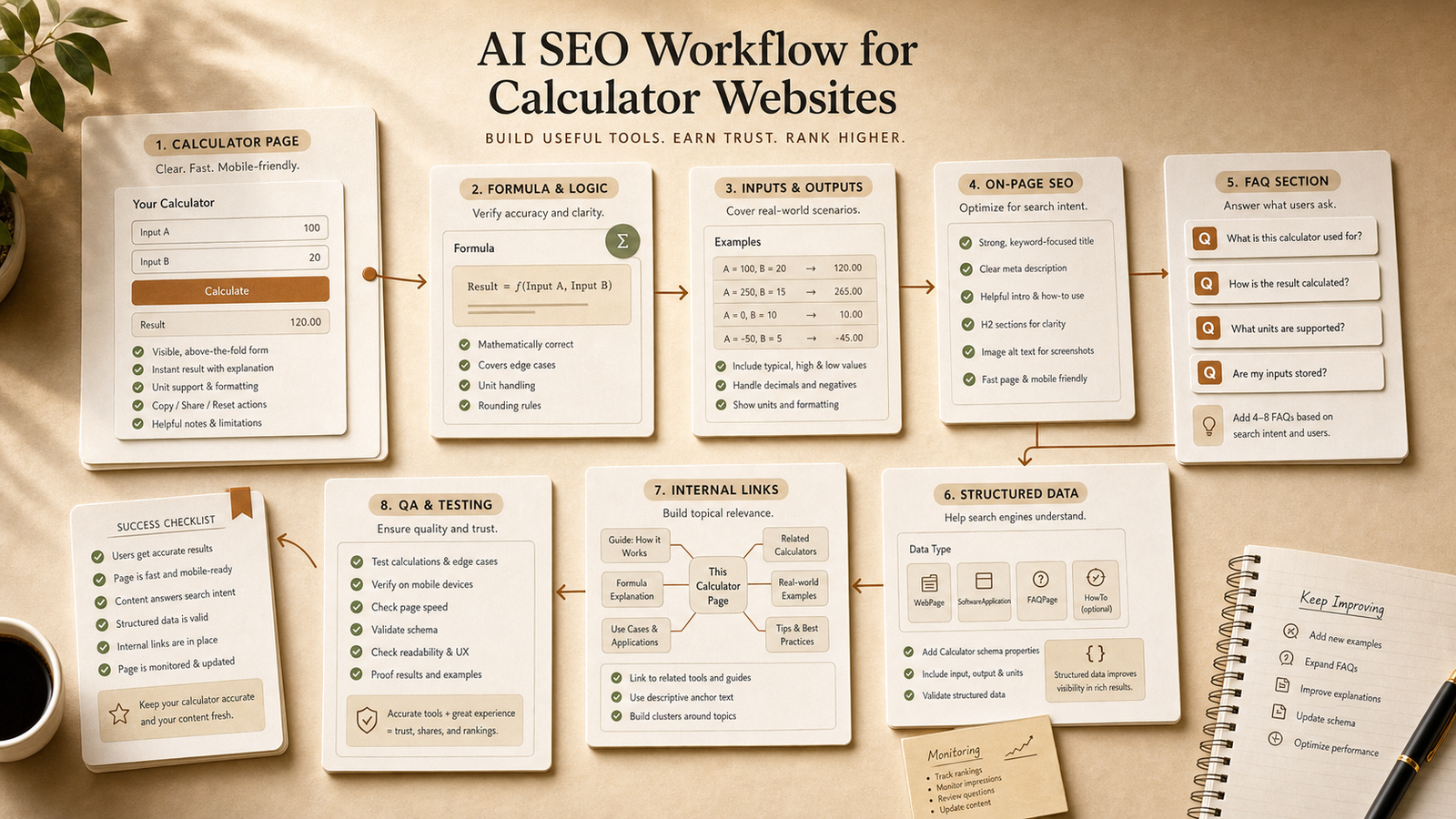
Calculator page SEO workflow.
Use this planning sequence for each tool page.
Write the user problem and expected result in plain language.
Document formula, assumptions, units, edge cases, and exclusions.
Plan inputs, helper text, result labels, and explanatory copy.
Create sample scenarios with expected results for QA.
Draft FAQs, metadata, and internal links to related calculators or guides.
Review formula, UX, content, links, and schema before launch.
Example prompt
Calculator SEO planning prompt.
Use this prompt to avoid unsupported formula generation.
Copy-ready prompt
Act as a calculator website SEO strategist. Plan a page for [CALCULATOR]. Ask for the formula if it is missing. Create user intent, required inputs, result explanation, assumptions, edge cases, examples, FAQs, internal links, metadata, and QA checks. Do not invent formulas, legal rules, tax rules, or financial assumptions.
Practical use case
Percentage calculator page.
For a percentage calculator, the workflow should cover increase, decrease, old value, new value, zero-value edge cases, example scenarios, and related calculators.
AI can draft explanations and FAQs after the formula is known.
Tools needed
Tool-page planning inputs.
You need the formula, test cases, related pages, a content brief, and a QA checklist.
NEOA can help with the brief, FAQ, internal link, and review workflow.
Mistakes to avoid
Do not let AI invent technical truth.
AI can write supporting explanations, but formulas and regulated rules need verification.
Also avoid hiding assumptions. The user should understand when the calculator result applies.
Recommended NEOA resource
Use a reusable calculator SEO brief.
Use the free SEO Agent Skill Pack to create a repeatable planning template for calculator pages.
Save the workflow to your NEOA dashboard and reuse it for each new tool page.
Detailed workflow
Build the page around the calculation task.
Calculator website SEO starts with user trust. The user needs a clear input, a reliable result, and an explanation that makes the result understandable.
AI can help plan the support content, but the calculation logic must be verified independently.
Define the exact calculation and the user situation it supports.
Document formula, units, assumptions, exclusions, and edge cases outside the AI draft.
Create input labels, helper text, result labels, and result interpretation notes.
Generate example scenarios with expected outputs and verify the math manually.
Draft supporting content, FAQs, structured data notes, and internal links to related calculators or guides.
Run QA for formula accuracy, accessibility, mobile layout, schema, and helpful next-step links.
Improved prompt
Calculator website SEO prompt.
This prompt keeps AI away from inventing formulas while still using it for page planning.
Copy-ready prompt
Act as a calculator website SEO strategist. Plan a calculator page for [CALCULATOR TOPIC]. If the formula, units, assumptions, or edge cases are missing, ask for them instead of inventing them. Create user intent, input requirements, result explanation, example scenarios, FAQ candidates, structured data notes, internal links from [APPROVED URL LIST], metadata direction, accessibility checks, and QA steps for formula verification. Do not invent legal, tax, medical, financial, or engineering rules.
Checklist
Calculator page QA checklist.
Use this before publishing or refreshing a calculator page.
Formula and assumptions are documented and verified outside the AI output.
Input labels and result labels are understandable without reading the full article.
Examples cover ordinary cases and at least one edge case.
FAQ answers clarify assumptions, interpretation, and limitations.
Internal links point to related calculators, guides, prompts, or free resources.
The page remains useful without making guaranteed SEO or outcome claims.
NEOA workflow
Use this AI SEO workflow for calculator websites guide inside the AI SEO hub.
Treat "AI SEO workflow for calculator websites" as one part of the broader NEOA AI SEO workflow. Start from the hub when you need the surrounding topic cluster, then adapt the prompt, run the SEO Content Agent, and save the free resource for repeatable use.
Open the AI SEO hub to see where this guide fits in the full keyword-to-refresh cycle.
Use the Prompt Library or Prompt Generator to adapt the example prompt for your site and audience.
Use the SEO Content Agent and free SEO Agent Skill Pack when the workflow should become repeatable.
Keep the final output human-reviewed before publishing, refreshing, or adding structured data.
Related agent skill
SEO Content Agent Skill
A structured agent skill for turning a keyword into a full SEO content brief, article outline, metadata, FAQ schema plan, and social distribution assets.
Free NEOA resource
Download the free NEOA SEO Agent Skill Pack
Use the free beta pack to plan calculator content briefs, FAQ sections, internal links, and review checks.
View resourceFree prompt pack
Get the prompt pack behind practical AI workflows.
Download 50 prompts for SEO, content, research, and business automation, then use them with this guide to make the workflow repeatable.
Free download
Get the prompt pack.
Choose your main interest and unlock the Markdown download.
Free during NEOA beta. You can download after submitting the form.
FAQ
Common questions
Can AI write calculator formulas?
Do not rely on AI to invent formulas. Use verified formulas and ask AI to help with explanations, examples, and page planning.
What should a calculator page include?
It should include clear inputs, result explanation, assumptions, examples, FAQs, related links, and verified calculations.
How can NEOA help calculator SEO?
NEOA provides free prompts and skill workflows for briefs, FAQs, internal links, and content review during beta.
What should AI do for calculator website SEO?
AI should help with page briefs, explanations, examples, FAQs, metadata, internal links, and QA checklists. It should not invent formulas.
How do I make a calculator page more useful?
Clarify inputs, explain results, disclose assumptions, include examples, answer common questions, and link to related tools or resources.
Final recommendation
Make the workflow repeatable before you scale it.
Use AI for page planning and explanation layers, but keep formula verification and final QA separate.